


4Fun lite - Group Voice Chat
4.2157.00 Reviews
App Specs
- Version
- 7.69
- Updated On
- License
- Free
- Downloads
- 10,000,000+
- Developer
- SpreadFun
- Categories
- Social
- Platform
- Android
Screenshots




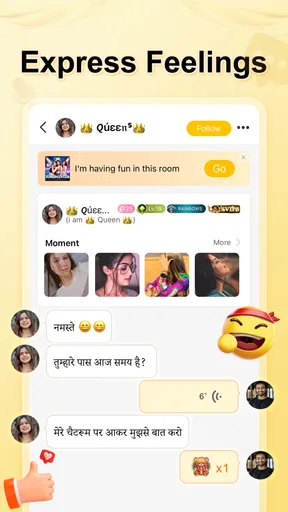

 Analysis by AppCompare
I came away from 4Fun lite with a fairly clear impression: it is best understood as a casual social space built around live group conversation, not as a replacement for a private messenger or a carefully moderated community platform. The appeal is immediate. You can enter a room, listen to people talking, join the flow when you feel comfortable, and move on without arranging a call in advance. That low-pressure rhythm makes it easy to use during a break, while commuting, or when you simply want some company.
At the same time, the open nature of a live chat room is also the app’s main challenge. Conversations can be uneven, the quality depends heavily on the room you choose, and the mature audience means I would not treat it as a general family app. My honest recommendation is simple: if you enjoy spontaneous voice-led socializing and do not mind browsing until you find rooms that suit you, it is worth trying. If you want dependable private conversations, structured communities, or a quiet experience, the usual messaging and group-chat alternatives will probably serve you better.
How the live-room experience feels in everyday use
The first thing I noticed is that the app asks for a different kind of attention from a standard text-based social network. With ordinary messaging, I can write something, leave, and return later. A live room is more immediate. I have to listen to the tone of the conversation, understand who is speaking, and decide whether I want to participate now. That makes the experience feel more human, but also less predictable.
I found the best way to approach it was not to treat the room list as a promise of entertainment. Instead, I treated it like browsing radio stations: sample a conversation, stay if the mood works, and leave without feeling committed. This is one of the app’s strongest qualities. It does not require me to organize a group before I can socialize. The room itself is the starting point.
A realistic use case is an evening when I have finished work but do not want to watch another video alone. I can open the app, spend a few minutes checking the available conversations, and join one that matches my mood. I might mostly listen at first, then speak when the topic becomes familiar. That is more convenient than coordinating a call with friends, especially when everyone is available at different times.
The same convenience can work during a short break. Traditional social platforms often encourage endless scrolling, while a live chat room gives me a reason to stay with one interaction for a while. However, it is not automatically more productive or calmer. If several rooms are noisy or the discussion is not welcoming, I can leave feeling that I spent time searching rather than connecting.
Why the live format is more engaging than text alone
Voice changes the social dynamic. A short spoken reply can feel warmer than a line of text, and a group discussion can develop naturally when people react to one another in real time. I also find that voice makes it easier to sense whether a room is relaxed, playful, argumentative, or simply inactive. That helps me decide quickly whether it is worth staying.
Worth Reading Before You Choose

EA SPORTS FC Mobile 26 Is a Bigger Football Game, but It Takes Time

Flipboard Shows What News Apps Must Do Beyond the Feed

Switching to Android Auto Means Rethinking Your Driving Routine

Google Calendar Makes a Crowded Week Easier to Manage

Ludo King Makes the Most of the Minutes Between Plans

Baby Panda World Brings Quick Play to Modern Phones, but Its Game Library Feels Busy
There is a useful trade-off here. The app lowers the barrier to starting a conversation, but it raises the barrier to participating thoughtfully. In text chat I can edit my words and answer at my own pace. In a live room, hesitation is more noticeable, and interruptions can make it hard to enter the discussion. New users who are shy may prefer to listen before speaking, and I think that is the sensible approach rather than forcing an introduction immediately.
Another practical point is that live rooms reward regular browsing. The quality of the experience is not fixed because the people and topics change. A room that feels dull at one moment may become enjoyable later, while a promising title does not guarantee an interesting discussion. I would judge the app by the range of rooms I can discover over time rather than by one disappointing session.
Small habits that make the app easier to enjoy
My first useful habit was to give a room a short trial instead of staying too long out of politeness. If the conversation is dominated by a few voices, the topic is uncomfortable, or the atmosphere feels hostile, leaving is the correct choice. A live social app works best when I remember that browsing is part of the experience, not a failure.
The second habit is to avoid joining when I need complete concentration. Even a quiet room can become active without warning, and listening to several people at once is not ideal while working, studying, or navigating traffic. I prefer using it when I can give the conversation at least partial attention. That makes the app feel more social and reduces the temptation to participate carelessly.
I also recommend deciding in advance how much interaction I actually want. Sometimes I am looking for conversation; sometimes I only want background company. Those are different needs, and the app can serve both only if I choose rooms accordingly. Entering without a clear expectation can make the experience feel random, while a simple goal—listen, meet people, or talk about a subject—makes room selection easier.
A less obvious trade-off is that spontaneous access can make social boundaries less clear. In a private group, I already know who is present. In an open live room, I need to pay more attention to the atmosphere and to how much personal information I share. I would keep introductions general until I know the people and the tone of the room. That is not a criticism unique to this app; it is a basic discipline for any open voice community.
What stands out, and where the experience falls short
The strongest evidence in its favor is the scale of its audience. The app has passed 10 million installs, and its 4.2 average from around 59 thousand ratings suggests that many people find the format worthwhile. Those figures do not guarantee that every room will suit me, but they support the idea that this is an established social destination rather than an empty experiment.
I also like that the concept is focused. It does not need to compete with a full social network’s news feed, photo tools, or elaborate profile system to be useful. The core question is straightforward: do I want to join a live group conversation right now? For users who answer yes, that focus can feel refreshing compared with apps that surround communication with many unrelated features.
SpreadFun has kept the product positioned as a free social app, which makes trying it uncomplicated. There are in-app purchases ranging from eleven cents to nearly three hundred dollars per item, so I would still approach optional spending carefully. The free entry point is useful for testing whether the room culture suits me before I consider paying for anything. I would not spend simply because a conversation is active; the value has to come from a repeated experience that genuinely improves how I use the app.
The current version is 7.69, and the app supports devices running Android 7.0 or later. For me, that makes it approachable on a broad range of Android phones, although the actual comfort of live voice use will still depend on the device, headphones, connection, and surrounding noise. A technically compatible phone is not automatically an ideal phone for long conversations.
The meaningful weakness: room quality is inconsistent
The biggest limitation is that the app cannot manufacture a good conversation. It can bring people together, but the result depends on who happens to be in the room. Some discussions may feel lively and welcoming; others may be repetitive, confusing, or difficult to enter. This is the central weakness of any open group voice service, and it matters more here than a missing convenience feature would.
That inconsistency affects newcomers most. Someone who enters a room at the wrong moment may hear an established group referring to earlier jokes or private context. Even if nobody intends to exclude them, the experience can feel closed. I think the app would suit me better when I am willing to browse patiently and accept that not every room is designed for a first-time participant.
Voice also creates friction that text chat avoids. Background noise, different speaking speeds, interruptions, and uneven microphone quality can make a discussion tiring. I would use headphones when possible and avoid speaking from a noisy place. These are practical adjustments, but they show why a live room is not always the most convenient option.
The mature rating is another important consideration. The app is intended for users aged 17 and over, so I would not recommend it for children or treat it as a supervised family space. Adults should still use judgment about the people they meet and the information they reveal. Anyone looking for a tightly controlled environment should choose a private group or a service with stronger community structure instead.
I also would not confuse popularity with personal fit. A large audience increases the chance of finding an enjoyable room, but it also increases the range of personalities and conversation styles. Some users will appreciate that variety; others will find it overwhelming. The app’s social strength and its unpredictability come from the same source.
How it compares with familiar alternatives
Compared with ordinary one-to-one messengers, this app is better for spontaneous discovery and worse for dependable personal contact. A private messenger is the obvious choice when I already know whom I want to reach, need a clear record of the conversation, or want control over who can participate. 4Fun lite makes more sense when the goal is to encounter a conversation rather than contact a specific person.
Compared with text-first group communities, its advantage is immediacy. Hearing people react in real time can create a stronger sense of presence than reading a thread. The disadvantage is that voice is harder to search, review, and join quietly. Text communities are usually better when I want detailed information, asynchronous discussion, or a record I can consult later.
It also differs from video-based social platforms because the emphasis is on conversation rather than appearance. That can feel less demanding for users who do not want to be on camera. On the other hand, the lack of visual context may make it harder to understand who is speaking or what the room’s social structure is. I would choose this app over video chat when I want lower-pressure participation, but not when visual demonstrations or face-to-face connection matter.
Who will get the most from it?
I think the best audience is adults who enjoy meeting unfamiliar people, can tolerate a little social uncertainty, and like conversations that develop without a fixed schedule. It is particularly suitable for someone who wants to listen before speaking, sample different room moods, and treat the app as a casual social activity rather than a serious communication tool.
It may also work for people who feel isolated during small gaps in the day. A live room can provide a feeling of shared time even when I am not actively leading the conversation. That does not replace close friendships, but it can be a pleasant supplement when I want human voices around me.
I would advise skipping it if privacy and predictability are the top priorities. It is also a poor match for anyone who dislikes unstructured conversation, becomes frustrated by interruptions, or needs a platform built around organized topics and long-term group membership. In those situations, a private messaging app or a moderated interest community is likely to be more satisfying.
Parents should also take the age guidance seriously. Because the app is rated Mature 17+, I would not install it for a younger teenager simply because the free download makes it easy to access. The same caution applies to adults introducing the app to someone unfamiliar with open voice communities: explain the importance of leaving uncomfortable rooms and avoiding unnecessary personal details.
Developer, cost, and the practical decision
SpreadFun’s app is free to download, which gives me a reasonable way to test it without committing money. I would spend a few sessions exploring different times and room styles before deciding whether it belongs in my regular rotation. That matters because the app’s value is experiential; a short glance at the interface cannot tell me whether the available conversations fit my personality.
The presence of optional purchases means I would keep a clear boundary between trying the service and paying within it. The listed purchase range stretches from very small amounts to items costing nearly three hundred dollars, so I would review every confirmation carefully and avoid treating spending as a shortcut to better social experiences. A good room should be enjoyable because of the people and conversation, not because I feel pressured to buy something.
For everyday use, I would also watch battery and data habits during longer voice sessions, especially on mobile networks. Live audio is more demanding than simply reading messages, and a phone that is comfortable for short visits may become less convenient during extended conversations. I would use it in shorter sessions at first, then adjust based on how naturally it fits into my routine.
My overall view is that the app’s strongest feature is not a complicated tool but the ease of entering a social moment. Its biggest weakness is equally fundamental: the social moment may be excellent, ordinary, or uncomfortable depending on the room. That makes the app more rewarding for curious users than for people who expect consistent results every time they open it.
My final recommendation
After weighing the convenience against the unpredictability, I see 4Fun lite as a worthwhile free experiment for mature users who enjoy live group voice chat. I would recommend it to a friend who wants casual company, likes discovering conversations, and is comfortable leaving rooms that do not feel right. The large installed audience and solid average rating make it reasonable to try, but they should be treated as context rather than a promise of a perfect personal experience.
I would not recommend it as my main messenger, a private support space, or a substitute for a well-moderated community. Those jobs require more control, continuity, and dependable access. Here, the pleasure comes from spontaneity, and spontaneity always carries some friction.
My verdict: try it if you want open-ended social browsing, but judge it by the rooms you actually enjoy rather than by its popularity. Give yourself time to learn which conversations suit you, protect your privacy, keep purchases deliberate, and remember that leaving a poor room is part of using the app well. With that mindset, it can be an entertaining addition to a social routine; without it, the inconsistency may outweigh the appeal.
Pros
- Lightweight app that uses less storage and mobile data.
- Quick access to group voice rooms and live conversations.
- Easy-to-use interface suitable for casual social users.
- Supports meeting people with shared interests and hobbies.
- Lite design can perform better on older or budget devices.
Cons
- Voice room quality may vary with network conditions.
- Public chats can include spam or inappropriate conversations.
- Some features may require in-app purchases or virtual gifts.
- Smaller user base may limit activity in certain regions.
- Background audio and notifications can increase battery usage.
FAQs for 4Fun lite - Group Voice Chat
What is 4Fun lite - Group Voice Chat?
4Fun lite is a social communication app focused on group voice conversations and casual interaction. After exploring its main features, it feels designed for users who want to join voice rooms, meet new people, chat with friends, and participate in community discussions without relying only on text messages. The lite version is generally aimed at providing a simpler, less demanding experience for mobile devices.
How does group voice chat work in 4Fun lite?
The app allows users to enter available voice rooms or create conversations where several participants can talk together. Depending on the room settings, you may be able to listen, request permission to speak, send messages, or interact with other members. Before downloading, remember that voice rooms can be public, so avoid sharing private information and review the room rules and privacy options carefully.
Is 4Fun lite free to download and use?
4Fun lite can generally be downloaded without an upfront payment, and its basic social and voice-chat functions may be available for free. However, apps in this category can include advertisements, optional virtual items, premium features, or in-app purchases. The exact cost and available paid content may vary by region and app version, so check the store listing and payment settings before making any purchase.
Does 4Fun lite require an account or personal information?
You may need to register or sign in before accessing all of the app’s communication features. Account creation can involve information such as a nickname, profile image, phone number, email address, or third-party login details, depending on the version available in your region. I recommend checking the requested permissions and privacy policy, and using only the information necessary to create a comfortable, secure profile.
Is 4Fun lite safe for children and suitable for everyone?
4Fun lite is a user-generated social platform, which means conversations and room topics can change quickly and may not always be appropriate for younger users. Public voice chats can also expose users to strangers, unwanted messages, or offensive behavior. Parents should check the official age rating, supervise usage, enable available privacy and blocking tools, and remind children never to share personal details or agree to meet online contacts.


